
Modified on: 31 May, 2026
Activating a subscription on Jooble gives you access to job posting features tailored to your hiring needs. This guide walks you through each step of the activation process so you can start publishing job ads quickly and without hassle.
Step 1. Log in to your employer profile
Go to Jooble for Employers page and sign in to your account. Once logged in, you will see the Activate Subscription Plan button in the top-right corner of the dashboard. Click it to begin.

Step 2. Select a subscription plan
The system will direct you to the subscription selection page. Review the available plans and choose the one that best fits your hiring volume and budget.
Step 3. Set up your payment profile
You will be prompted to create and fill out a payment profile, or select an existing one.
Important: If you need to receive a Completion Certificate or a tax invoice, please fill out your payment profile as a legal person. This ensures that all billing documents are issued correctly for accounting purposes.
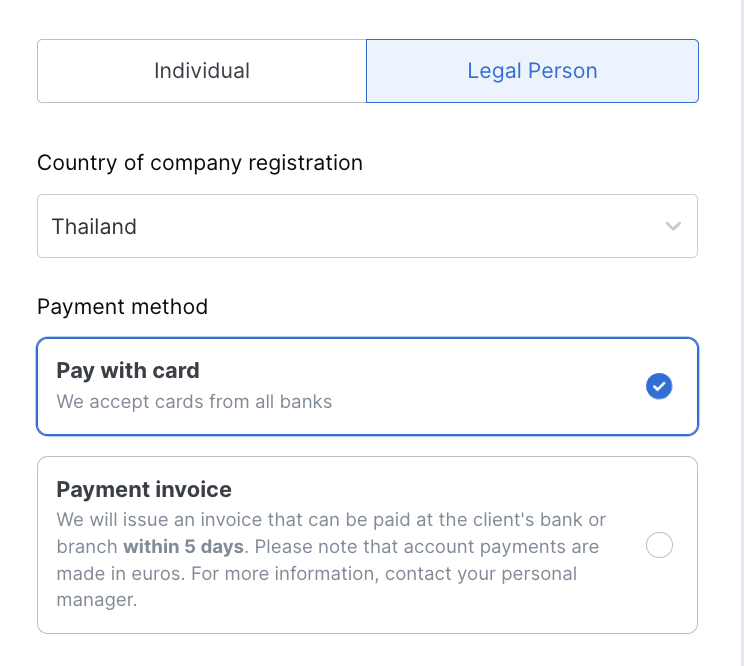
You can link a payment card (corporate or personal) for automatic recurring payments, or set up a payment profile with the invoice payment type.
If your account uses the CPA model, card payment is the only available payment method. If your account uses the subscription model, both card and invoice payments are supported.
Please note: The CPA model is not yet available in all countries. Please contact our support team to check availability in your region.
Step 4. Confirm and activate
Once your payment profile and payment method are set up, confirm your selection. Your subscription will be activated immediately, and you will be able to start publishing job postings.
Before payment please check out our Terms of Job Posting and Content Requirements
If you have any questions or encounter any issues during the activation process, please reach out to our support team — we are happy to assist.