
Modified on: 28 Jul, 2026
If you have filled your vacancy or want to pause your recruitment process, you can easily deactivate your active job listing on Jooble.
Step-by-Step Deactivation Guide
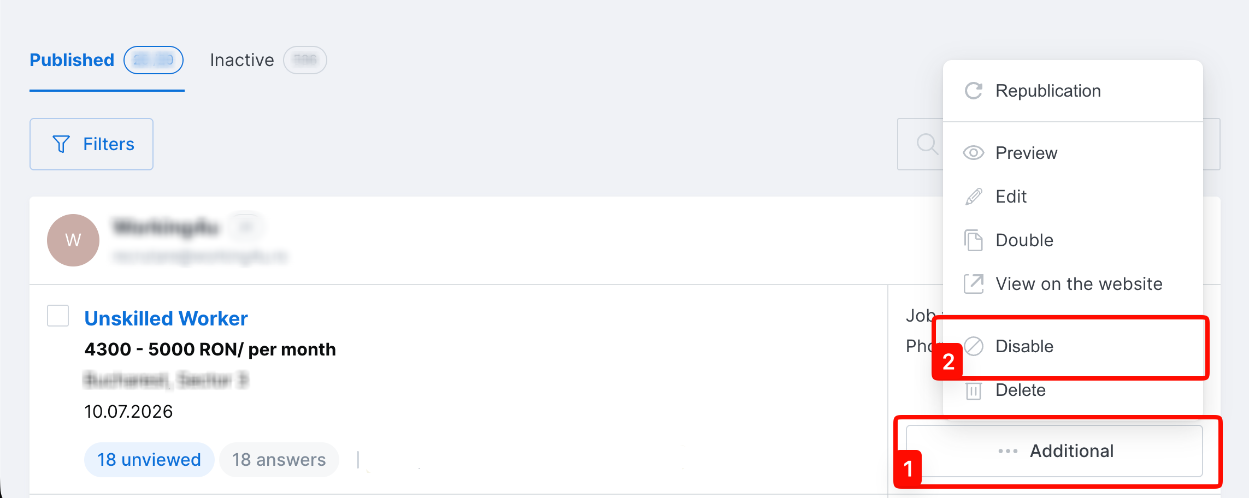
- Log in and locate your vacancy: Access your Jooble employer account and find the active vacancy you want to disable on your dashboard.
- Disable the job posting: Click on the ... Additional button (marked with 1 in the image below) at the bottom of the job card, then select Disable (marked with 2) from the dropdown menu.
If you experience any issues or cannot find the deactivation options, please feel free to contact Jooble Customer Support for assistance.